45th
Anniversary
News from Strong Concepts...
For immediate on-line help, visit or search our
User
Discussion Forum
TEAPAC Complete Is
Now Distributed
as a
Free Download!
Full Usage Level 3 - 500 Intersections
Ver 9.5 Jan 26, 2019
License Key No Longer Required
Download the new free version here
(future updates will also be free)
Maintenance technical support via email is still available by contract
TEAPAC Complete
(Ver 9)
Includes:
Highway Capacity Manual Methods
6th Edition (HCM 2016)
HCM 2016 Streets & Signals Methods
for signalized arterial street & signalized intersection capacity analysis
(read details of TEAPAC Complete 2016 upgrade
here)
HCM 2000 Signals Method
for signalized intersection capacity analysis
If you haven't seen or used TEAPAC Complete
recently, download the new free version and
pay attention to all of the features of TEAPAC Complete listed below that cannot
be
found in any other traffic and transportation software.
Only
TEAPAC Complete Can Do These Things For You
-
HCM-Compliant Capacity Analysis &
Optimization For HCM 2016 & HCM 2000 Methods
the only fully HCM-compliant
software for traffic signals that allows HCM capacity analysis & HCM delay
optimization using either the 2016 or 2000 HCM method for signals.
-
Export & Import Integration With A
Dozen Other Programs
the only software with
export/import integration with over a dozen other traffic software tools
to give you the most flexible analysis options to meet your project needs (ie,
HCS, Synchro, TRANSYT, CORSIM, etc.) see
schematic of integration here
-
Use HCM Average Greentimes for Further
Analysis
the only software that allows the
use of more realistic HCM average green times for time space diagrams
& all Export functions.
-
Powerful & Flexible Scenario
Management
the only software with powerful
& flexible scenario management that allows the efficient analysis of
multiple scenarios, without the data duplication that occurs using File-SaveAs
for alternative files which is nearly impossible to manage after the fact.
-
Simple Automation Tools (Macros)
the only software that provides
simple automation tools (macros) for easily defining repetitive tasks
and performing an entire integrated analysis with a single click.
-
Volumes Shared By All Analyses Can Be
Entered Automatically
the only software that moves
traffic counts directly from electronic traffic counters to fully-integrated
traffic analyses such as signal & stop warrants, HCM capacity analysis, HCM
signal delay optimization and traffic impact analysis, without manually
entering any volumes.
-
Backed By 45 Years of PE & PTOE
Development & Support
the only traffic and transportation software
available today that is backed by 45 years of
development & support by a professional traffic engineer (PE).
-
read the details about these unique aspects of TEAPAC
Complete
here
and see how these unique features work for you to complete your analyses
accurately, efficiently and
effectively.
 TEAPAC
Complete 2010, Ver 8.6: A Major Update
TEAPAC
Complete 2010, Ver 8.6: A Major Update
- Average Phase Times from HCM Used for
Time-Space and Export
- HCS 2010 New File Format Is Supported
- New HCM 2010 Modeling and Refinements
TEAPAC
Complete 2010 now uses
realistic average phase times from the HCM when viewing
time-space diagrams, platoon progression diagrams and exporting for
optimization and simulation to programs like TRANSYT, PASSER, CORSIM,
Synchro and TruTraffic. Real analysis. Real
optimization.
Get more Reality with TEAPAC
Complete
2010.
- more enhancements and details
here,
free update for licenses under maintenance
here.
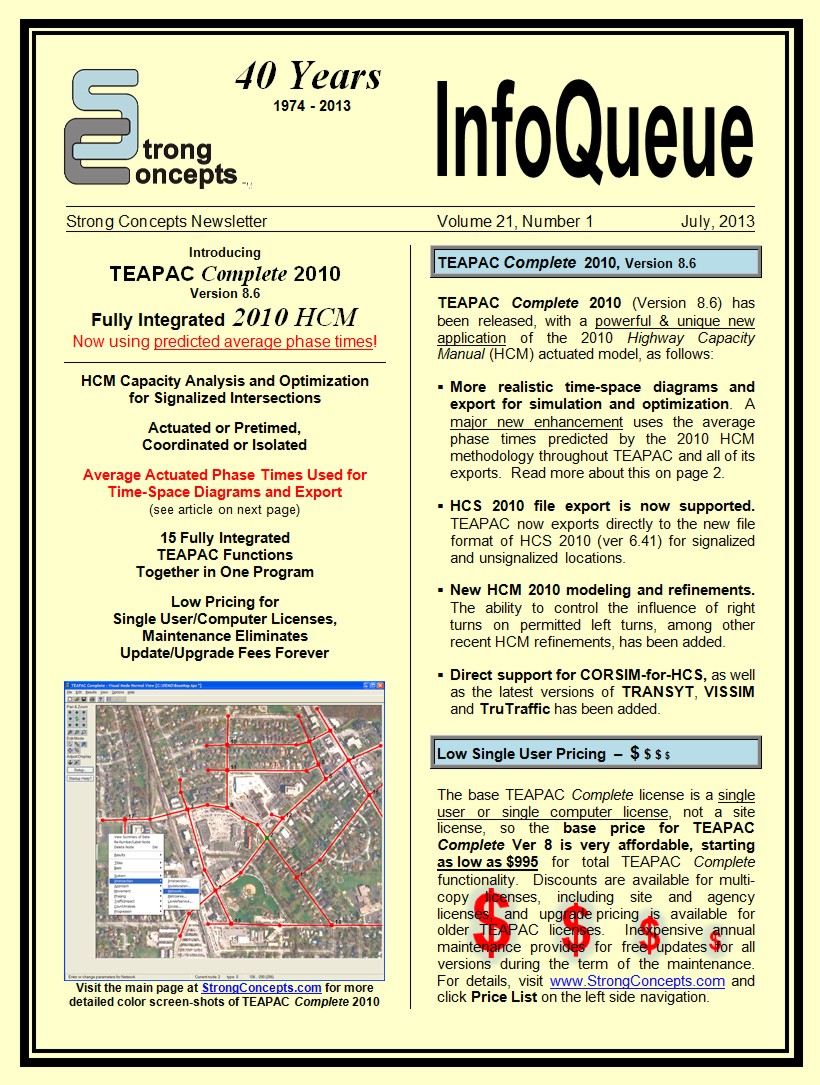
Read Our Newsletter: InfoQueue Vol 21,
No 1 (click image at right)
Read about Ver 8.6 Details and TEAPAC
Complete
2010
- latest issue, back issues, published papers and more
here.
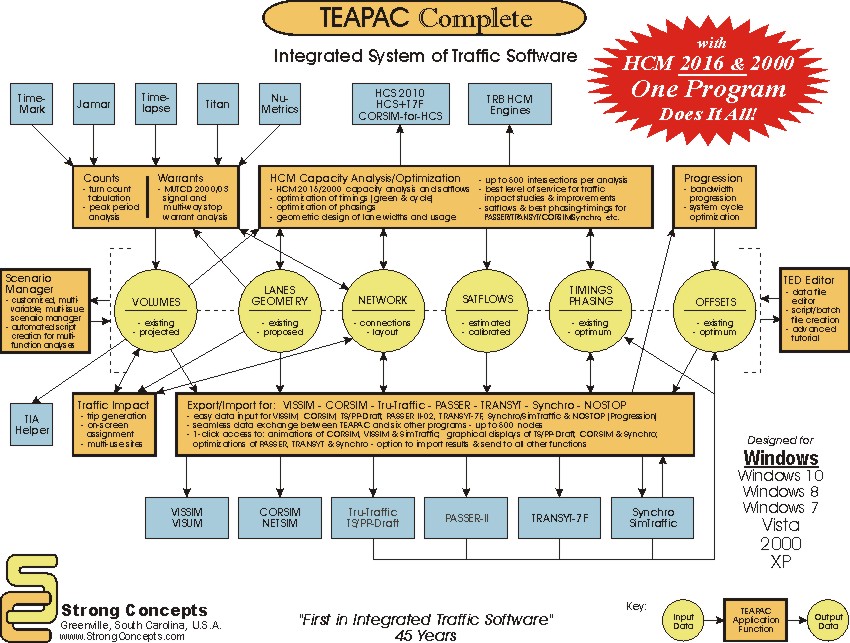
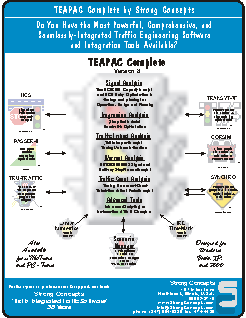
click flowchart above for a magnified view, or
for PDF click here
40 Years of TEAPAC
Quality and Innovation: 1974-2014
|

 
Announcing
TEAPAC
Complete
2010
Version 8.6 Update
from
Strong Concepts
Now using HCM-predicted average phase
times!
_________________________________________
Version
8.5
has
Real HCM 2010
Capacity Analysis
and Optimization
for
Signalized Intersections
••• Actuated or Pretimed! Coordinated or
Isolated! •••
2010
Highway Capacity Manual
Ver 8.5 Provides:
••• The first commercial software
available for HCM 2010 •••
The 2010 HCM was
published by TRB in April, 2011 - Ver 8.50 was released
concurrently.
Real Availability!
••• Fully functional, HCM-compliant capacity
analysis for HCM 2000 or HCM 2010 •••
HCM actuated, HCM LOS, HCM delay, HCM
queue, HCM satflow, HCM capacity, HCM v/c.
Real HCM!
••• The only program that can optimize the HCM delay of
individual movements •••
Optimize green splits, cycle
length and phasing to achieve a target amount of delay for
critical movements.
Real Optimization!
••• The new
HCM
IQA delay method developed for TRB by TEAPAC's author •••
Dennis Strong, P.E., TRB Committee Member & former chair of HCM Signals Subcommittee.
Real Knowledge!
••• Full modeling of actuated
signal behavior with a published Federal method •••
Export to TRB's HCM
computational engine to verify HCM compliance.
Real Dependability!
••• TEAPAC Complete 2010
connects all your traffic studies to both HCM versions •••
Site Traffic TIA,
Traffic Counts, MUTCD Warrants, Progression, HCM 2000, HCM 2010,
TRANSYT, CORSIM, Synchro, SimTraffic, VISSIM,
PASSER, TruTraffic.
Real Integration!
••• Upwards and backwards
compatible with all your prior TEAPAC data files •••
Free updates and technical
support with inexpensive annual maintenance (included).
Real Utility!
Download a
Demo or an
Update
TODAY -- yes, Real Availability!
See the HCM 2010 applied to
your real intersections!
example
Real Software for Your
Real Traffic
Problems!
|

Reality
Is
TEAPAC
Complete
2010
See Why Here
(PowerPoint slide show)
40
Years
of
Quality
and Innovation
=
1974 - 2014 =
|
|
October
12, 2016 - TEAPAC
Complete 2016 Ver 9.01
Build 01 posted for download. Major HCM2016 Upgrade. Read more about the details of this
release
here.
The Ver 9.01.01 Update is free for TEAPAC
Complete Ver 8 licenses under a current maintenance contract
here.
May 12, 2014 - TEAPAC
Complete 2010 Ver 8.62
Build 01 posted for download. Read more about the details of this
release
here.
The Ver 8.62.01 Update is free for TEAPAC
Complete Ver 8 licenses under a current maintenance contract
here.
January 22, 2014 - TEAPAC
Complete 2010 Ver 8.61
Build 01 posted for download. Major HCM2010 Update for
Shared-Permitted Left Turns (SPLT). Read more about the details of this
release
here.
The Ver 8.61.01 Update is free for TEAPAC
Complete Ver 8 licenses under a current maintenance contract
here.
August 23, 2013 - TEAPAC
Complete 2010 Ver 8.60
Build 02 posted for download. Read more about the details of this
release
here.
The Ver 8.60.02 Update is free for TEAPAC
Complete Ver 8 licenses under a current maintenance contract
here.
July 8, 2013 - TEAPAC
Complete 2010 Ver 8.60
Build 01 posted for download. Major Enhancement Release. Read more about the details of this
release
here.
The Ver 8.60.01 Update is free for TEAPAC
Complete Ver 8 licenses under a current maintenance contract
here.
April 10, 2013 - TEAPAC
Complete 2010 Ver 8.55
Build 01 posted for download. Includes updated HCM2010
methodology changes. Read more about the details of this
release
here.
The Ver 8.55.01 Update is free for TEAPAC
Complete Ver 8 licenses under a current maintenance contract.
December 29, 2012 - TEAPAC
Complete 2010 Ver 8.54
Build 01 posted for download. Includes updated HCM2010
methodology changes. Read more about the details of this
release
here.
The Ver 8.54.01 Update is free for TEAPAC
Complete Ver 8 licenses under a current maintenance contract.
November 20, 2012 - TEAPAC
Complete 2010 Ver 8.53
Build 01 posted for download. Read more about the details of this
release
here.
The Ver 8.53.01 Update is free for TEAPAC
Complete Ver 8 licenses under a current maintenance contract.
January 12, 2012 - TEAPAC
Complete 2010 Ver 8.52
Build 01 posted for download. Read more about the details of this
release
here.
IMPORTANT: Read suggested analysis and optimization considerations for this release
here.
The Ver 8.52.01 Update is free for TEAPAC
Complete Ver 8 licenses under a current maintenance contract.
September 23, 2011 - TEAPAC
Complete 2010 Ver 8.51
Build 08 posted for download. Read more about the details of this
release
here.
IMPORTANT: Read suggested analysis and optimization considerations for this release
here.
The Ver 8.51.08 Update is free for TEAPAC
Complete Ver 8 licenses under a current maintenance contract.
August 24, 2011 - TEAPAC
Complete 2010 Ver 8.51
Build 04 posted for download. Read more about the details of this
release
here.
IMPORTANT: Read suggested analysis and optimization considerations for this release
here.
The Ver 8.51.04 Update is free for TEAPAC
Complete Ver 8 licenses under a current maintenance contract.
June 21, 2011 - TEAPAC
Complete 2010 Ver 8.51
Build 02 posted for download. Read more about the details of this
release
here.
IMPORTANT: Read suggested analysis and optimization considerations for this release
here.
The Ver 8.51.02 Update is free for TEAPAC
Complete Ver 8 licenses under a current maintenance contract.
June 17, 2011 - TEAPAC
Complete 2010 Ver 8.51
Build 01 posted for download. Read more about the details of this
release
here.
IMPORTANT: Read suggested analysis and optimization considerations for this release
here.
The Ver 8.51.01 Update is free for TEAPAC
Complete Ver 8 licenses under a current maintenance contract.
June 7, 2011 - TEAPAC
Complete 2010 Ver 8.50
Build 04 posted for download. Read more about the details of this
release
here.
The Ver 8.50.04 Update is free for TEAPAC
Complete Ver 8 licenses under a current maintenance contract.
May 11, 2011 - TEAPAC
Complete 2010 Ver 8.50
PreRelease 03 posted for download. Read more about the details of this
release
here.
The Ver 8.50.03 Update is free for TEAPAC
Complete Ver 8 licenses under a current maintenance contract.
|
TEAPAC
Complete
Version 8
from
Strong Concepts
Announcing
Ver 8.23
Adding to the Continuous Flow of
Useful, Free Updates
read more
Ver 8.23 Provides:
• Support for 4-digit node numbers.
• New Options for numbering nodes during network
creation.
• Interface with TRANSYT & CORSIM for large node
numbers.
• Support for new CORSIM 6.2
Ver 8.22 Provides:
• Additional Actuated Inputs for Synchro Export/Import.
• New Support for 170 & Nema-TS2 Controllers for Synchro,
TSPPD and TruTraffic.
• New Abort Button in Output Window Allows Better Control
of Long Analysis Runs.
|
37
Years
of Innovation
=
1974 - 2010 =
|
|
September 30, 2010 - Ver 8.23 Build 05 posted
with minor fixes. Read more about the
details of this release
here.
The Ver 8.23.05 Update is free for TEAPAC
Complete Ver 8 licenses under a current maintenance contract.
August 24, 2010 - Ver 8.23 Build 04 posted
with minor fixes. Read more about the
details of this release
here.
The Ver 8.23.04 Update is free for TEAPAC
Complete Ver 8 licenses under a current maintenance contract.
May 10, 2010 - Strong Concepts announces the
release of TEAPAC
Complete
Ver 8.22 providing additional actuated input parameters for
interfacing with all versions of Synchro (detector locations and additional
actuated controller settings) and other enhancements. Read more about
the details of this release
here.
The Ver 8.22.00 Update is free for TEAPAC
Complete Ver 8 licenses under a current maintenance contract.
In the 22 months since the initial
release of TEAPAC
Complete
in September 2008 there have been 11
official releases with significant enhancements for specific new
functionality (8 of these updates include major new features), plus several other un-official pre-releases which promptly
fixed minor problems as they were identified. This is an average of
one new release with important new functionality every two months!
Can you say this about
any
other software you are using?
We don't think so!
Here's a brief list of the major enhancements
which have been made since TEAPAC
Complete
was released less than 2 years ago (read the details
here) -
and all these updates and enhancements were delivered free of charge
to licensees who were under up-to-date maintenance agreements!
Ver 8.23.03 20JUL10
• 4-digit Node Numbering Allowed
in TEAPAC
• Interface with TRANSYT and CORSIM
for Large Node Numbers
• New Node Numbering Options During Network Creation
• Support for New CORSIM 6.2
Ver 8.22.00 10MAY10
• Additional Actuated Inputs Provided
for Export/Import to/from Synchro.
• New Support for 170 & Nema-TS2 Controllers
for Synchro and TSPPD/TruTraffic.
• New Abort Button in Output Window Allows Better Control of Long Analysis
Runs.
Ver 8.21.00 12FEB10
• MUTCD 2009 Analysis of Warrants for Signals and
Signs Now Supported.
• Launch VISSIM Animation Automatically with New EXPORT Option.
Ver 8.20.00 18NOV09
• VISSIM Simulation and Animation Has Been Added to
TEAPAC's Export Function.
• New Tru-Traffic Program Fully Supported
by TEAPAC's Export and Import.
• Conditional Turns Are Now Modeled in CORSIM.
• Windows 7 Is Fully Supported.
Ver 8.10.12 15SEP09
• PDF User Guide Can Be Displayed from Help Menu.
Ver 8.10.09 11JUL09
• Synchro Import Enhancements Set Clearance Time Requirements in TEAPAC.
Ver 8.10.06 20JUN09
• New Lost Time Method Supported for Export/Import to/from Synchro Ver 7.
Ver 8.10.03 18MAY09
• Red Clearance (All-Red) Time Now Supported
Directly by TEAPAC.
• Pedestrian-Specific Signal Timing Parameters
Can Now be Entered.
• Major Enhancement for TIMINGPLAN Output Report,
Especially for Dual Rings.
• New NEMAPHASES Entry Allows Labeling of Phases.
• PLOTTSD Function Expanded for the Possibility of
Two Green Bands per Cycle.
Ver 8.01.04 27JAN09
• Direct Support for New CORSIM Ver 6.1.
Ver 8.01.01 08DEC08
• Direct Support for New TS/PP-Draft Ver 8
Export and Import.
Ver 8.00.02 08SEP08
• First release of TEAPAC Complete, Ver 8.00.
TEAPAC
Complete
is the most comprehensive
traffic engineering software available, and as the above attests, it
continues to be the most actively developed traffic software you can get. One program currently covers all of the following analysis categories with
seamless exchange of inputs and results between all functions, such as peak
period volumes, projected traffic volumes, optimized signal timings,
computed saturation flow rates, etc. -
TEAPAC
Complete
Is:
|
HCM-compliant signalized
capacity analysis and full HCM
optimization of splits, cycle and phasing (aka
SIGNAL2000). |
| Estimation of
projected volumes for traffic impact
studies, including user-adjustable, automated
on-screen assignments of site traffic (aka SITE). |
|
MUTCD-compliant
signal warrant and
multi-way stop warrant
analyses (aka WARRANTS). |
| Complete
traffic count analysis,
including peak period determination and
import of count data from a multitude of
electronic traffic counters, like Jamar (aka TURNS). |
| Simplified
bandwidth arterial progression
optimization with full-color
time-space bandwidth diagrams (aka NOSTOP) |
|
Full Export Capabilities for
well-established third-party programs, such as HCS,
TRANSYT-7F, PASSER-II, VISSIM, CORSIM,
TS/PP-DRAFT, TRU-TRAFFIC and SYNCHRO/SIMTRAFFIC
(aka SIGNAL2000, PRETRANSYT, PREPASSR, PRENETSIM, PRETSPPD and
PRESYNCHRO). |
|
Full Import Capabilities for
a complete network created in SYNCHRO
Ver 5, 6, 7 or 8 (aka PRESYNCHRO). |
| Revolutionary
multi-variable, multi-scenario data
management for all TEAPAC functions above,
customizable to project-specific needs (aka SCENARIO). |
|
One downloadable manual (and
one on-screen help system) covers the entire breadth of TEAPAC
functions, with full index
and improved graphics and output
examples. |
Of course, we're in the midst of developing
even more major enhancements to be delivered at no charge to our current
users. To get the value and power of TEAPAC
Complete both now and into the
future, and at its new, low pricing,
contact Strong Concepts today and see why we're
always...
"First in
Integrated Traffic Software"
37 Years
At this
website you can -
• Download free demos
here.
• See screen-shots of the drag-and-drop graphical user interface
here.
• Read testimonials from our users
here.
• Look at a flowchart of the integrated data and analyses covered by TEAPAC
Complete
here.
• Learn how using TEAPAC
Complete
can help you with your
GREEN agenda
here.
• Print an order form for your own copy of TEAPAC
Complete
here.
|
New - March 15 - MUTCD 2009 Update
Ver 8.21, 8.20 and 8.10 Releases Add New Features and Options
~
see Mar 15, Nov 18 and May 21 articles below ~
"Go Green
and
Save Gas"
see how
Use TEAPAC
Complete
to improve
your traffic signal timings
and all your traffic engineering
efforts
|
|
The New TEAPAC Complete
was seen in action recently at
the ITE Annual
Meeting & Exhibit .
Read more
details here.
MUTCD 2009
Signal and Sign Warrant Analyses Are Here!
March 15, 2010 - Version 8.21 (Build 02) is
available for download. Ver 8.21.02 adds a new capability for MUTCD
2009 Warrant Analyses, the ability to launch a VISSIM export
directly into simulation/animation, and fixes some SYNCHRO Export
problems associated with using user-supplied Nema phase numbers.
Read more
and download here.
The Ver 8.21.02 Update is free for TEAPAC Complete Ver 8
licenses under a current maintenance contract.
November 18, 2009 - Version 8.20 (Build 00) is
available for download. Ver 8.20.00 adds a new capability to export
complete TEAPAC signalized networks to VISSIM, and adds full support for
the new Tru-Traffic program, includes new modeling capabilities for
CORSIM, and provides new options for signalized intersection
warrant analyses. Ver 8.20 has also been tested and optimized for
Windows 7.
Read more
and download here.
The Ver 8.20.00 Update is free for TEAPAC Complete Ver 8
licenses under a current maintenance contract.
|
|
|
What's New: |
TEAPAC
Complete,
Version 8.2
Adds New Features and Options
| |
Export Capabilities for
VISSIM Simulation and Animation
1-click
export for complete TEAPAC signalized networks
directly to VISSIM |
| |
Full Support
for the New Tru-Traffic Program
implements new background
options, as well |
| |
New Modeling
Capabilities for CORSIM
volume assignments supported for
diamond interchange flows |
| |
New Option
to Include Additional Signal Warrants
warrants analyzed externally can
be included in results |
| |
Windows 7 Is
Fully Supported
with
continued complete support for all 32-bit Windows
(XP, Vista, etc.)
---------
read more about all of these
enhancements here |
|
| |
TEAPAC
Complete,
Version 8
All of TEAPAC in One
Program with
New Low Pricing Options!
TEAPAC
Complete (Version
8) merges all TEAPAC programs
into a
single program and license,
with new,
lower pricing for single user/computer licenses.
Read the Ver 8 announcement
here for details
and to see examples
of how
Strong Concepts' 35
years of PE/PTOE experience
in traffic and transportation engineering
and
professional software development
are hard at
work for you as the
TEAPAC
Complete user.
|
| |
|
|
October 27, 2009 - Version 8.10 (Build 14)
maintenance update is
available for download. Ver 8.10.14 fixes some minor problems with
Synchro imports of ideal satflow rates and the synchronization of the Edit
menu with selected dialog displays for the TrafficImpact and CountAnalysis
sub-menus.
Read more
and download here.
The Ver 8.10.14 Update is free for TEAPAC Complete Ver 8
licenses under a current maintenance contract.
September 15, 2009 - Version 8.10 (Build 12)
maintenance update is
available for download. Ver 8.10.12 fixes certain network display problems
for T-intersections, fixes a problem using the pre-programmed scenario
templates, and adds an option to the Help menu to open the PDF User Guide.
Read more
and download here.
The Ver 8.10.12 Update is free for TEAPAC Complete Ver 8
licenses under a current maintenance contract.
July 11, 2009 - Version 8.10 (Build 09)
maintenance update is
available for download. Ver 8.10.09 updates and fixes potential problems
with certain Synchro imports, enhances exporting to NOSTOP, adds the cycle
length to a few Signal Analysis output reports, and adds approach and
movement labels to certain Edit menus for the Tabular View. Ver 8.10.09 is an important
maintenance release recommended for all Ver 8.10 users. Read more
and download here.
The Ver 8.10.09 Update is free for TEAPAC Complete Ver 8
licenses under a current maintenance contract.
June 20, 2009 - Version 8.10 (Build 06)
maintenance update is
available for download. Ver 8.10.06 fixes potential problems caused by
deleting dummy nodes, adds support for a new lost time method used by
Synchro 7, and improves the default Import folder management for Export AUTO
and Import AUTO. Ver 8.10.06 is an important
maintenance release recommended for all Ver 8.10 users. Read more
and download here.
The Ver 8.10.06 Update is free for TEAPAC Complete Ver 8
licenses under a current maintenance contract.
May 21, 2009 - Version 8.10 (Build 04) is
available for download. Ver 8.10.04 adds new features for red
clearance time (all-red), pedestrian WALK and Flash Don't Walk timing,
Nema phase
numbering, enhanced TimingPlan output report, and many other enhancements.
Read more and see example output in article below. Read
details
and download here.
The Ver 8.10.04 Update is free for TEAPAC Complete Ver 8
licenses under a current maintenance contract.
|
|
|
What's New: |
TEAPAC
Complete,
Version 8.1
Adds New Features and Options
| |
Red Clearance (All-Red) Time Now Supported
Directly
accepts separate entries for
yellow change and red clearance intervals |
| |
Pedestrian-Specific Signal Timing Parameters Can Now
Be Entered
WALK and Flash Don't Walk entries
also constrain optimization |
| |
TimingPlan
Output Report Has Been Significantly Enhanced
see example output report
here
(PDF format) |
| |
Nema Phase
Numbering Can Be Used to Label Phasing Displays
read more about all of these
enhancements here |
|
| |
TEAPAC
Complete,
Version 8
All of TEAPAC in One
Program with
New Low Pricing Options!
TEAPAC
Complete (Version
8) merges all TEAPAC programs into a single program and license,
with new, lower pricing for single user/computer licenses.
Read the Ver 8 announcement
here for details and to see examples
of how Strong Concepts' 35
years of PE/PTOE experience
in traffic and transportation engineering and
professional software development are hard at
work for you as the TEAPAC
Complete user.
|
| |
|
|
If you've used
TEAPAC before,
you won't believe the impact using TEAPAC Complete will
have on your work effort.
If you haven't used TEAPAC yet,
now's the time to try it -- download a demo today,
and see why we're...
"First in
Integrated Traffic Software"
35 Years
January 27, 2009 - Version 8.01 update (Build
04) is available for download. Ver 8.01.04 supports CORSIM Ver 6.1 and
includes several other enhancements and fixes. Read more
here.
Update to Ver 8.01.04 is free for TEAPAC Complete Ver 8
licenses under a current maintenance contract.
December 8, 2008 - Version 8.01 update (Build
01) is available for download. Ver 8.01.01 supports TS/PP-Draft Ver 8
and includes several other enhancements and fixes.
Read more here.
Update to Ver 8.01 is free for TEAPAC Complete Ver 8
licenses under a current maintenance contract.

|
|
|
What's New: |
TEAPAC
Complete,
Version 8.0
All of
TEAPAC in One Program with
New Low Pricing Options!
| |
All 15 TEAPAC Programs
Together in One Program - TEAPAC
Complete |
| |
New Lower
Pricing for Single-User/Single-Computer Licenses |
| |
New Software
Maintenance Plan Eliminates Update/Upgrade Fees
Forever |
| |
Familiar
Visual TEAPAC Interface and Upwards
Compatibility |
|
| |
TEAPAC
Complete (Version
8) has been released merging all TEAPAC programs into a single program and license,
with new, lower pricing for single-user/single-computer licenses. Read on to see examples
of how Strong Concepts' 35
years of PE/PTOE experience
in traffic and transportation engineering and
professional software development are hard at
work for you as the TEAPAC
Complete user.
|
| |
Summary
of TEAPAC
Complete (Ver 8) |
| |
»» |
All 15 TEAPAC Programs Together in
One Program - TEAPAC
Complete |
| |
|
• |
HCM2000-compliant signalized capacity
analysis and full HCM optimization
of splits, cycle and phasing (also
known as SIGNAL2000). |
|
• |
Estimation of projected volumes for
traffic impact studies, including
user-adjustable, automated on-screen
assignments of site traffic (also
known as SITE). |
|
• |
MUTCD-compliant signal warrant and multi-way
stop warrant analyses (also known
as WARRANTS). |
|
• |
Complete
traffic count analysis, including
peak period determination and import
of count data from a multitude of
electronic traffic counters (also
known as TURNS). |
|
• |
Simplified bandwidth
arterial progression optimization with
full-color time-space diagrams
(also known as NOSTOP). |
|
• |
Full
Export Capabilities for well-established
third-party programs, such as HCS,
TRANSYT-7F, PASSER-II, CORSIM,
TS/PP-DRAFT, TRU-TRAFFIC and SYNCHRO/SIMTRAFFIC
(also known as SIGNAL2000, PRETRANSYT,
PREPASSR, PRENETSIM, PRETSPPD and PRESYNCHRO). |
|
• |
Full
Import Capabilities for a complete
network created in SYNCHRO Ver 5, 6 or 7
(also known as PRESYNCHRO). |
|
• |
Revolutionary multi-variable,
multi-scenario data management for all
TEAPAC functions above, customizable to
project-specific needs (also known as
SCENARIO).
read more about
SCENARIO
 |
|
• |
Seamless exchange
of inputs and results between all
functions, such as peak
period volumes, projected traffic volumes,
optimized signal timings, computed
saturation flow rates, etc. |
|
• |
One
downloadable manual (and one on-screen help
system) covers the entire breadth of
TEAPAC functions, with full index
and improved
graphics and output examples. |
|
»» |
New Lower
Pricing for Single-User/Single-Computer Licenses |
| |
|
• |
The base TEAPAC license is now a single-user/single-computer license, not a site license,
so the base price for TEAPAC Complete Ver 8
is significantly lower than before, as
low as $995 for the entire TEAPAC system.
see current price
schedule
|
|
• |
Discounts
are available for multi-copy
licenses, including site licenses and agency
licenses. see
current price schedule
|
|
• |
Upgrade
pricing is available for recent
TEAPAC licenses.
contact us for a
quote
|
|
»» |
New Software
Maintenance Plan Eliminates Update/Upgrade Fees
Forever |
| |
|
• |
New licenses (and upgrades from prior
versions) include maintenance for the next
12 months, which includes free downloads
of any and all updates and upgrades
posted during the maintenance period.
|
|
• |
Low and predictable pricing for future
maintenance periods - no more guesswork to
budget for future updates or upgrades. |
|
»» |
Familiar
Visual
TEAPAC Interface and Upwards Compatibility
read more about the
Visual TEAPAC Interface
|
| |
|
• |
Graphical front-end allows
drag-and-drop on-screen network editing and
creation over a background bitmap image
(such as aerial photos, maps, plan drawings,
etc.).
examples
|
|
• |
Enhanced
graphical reports make results
easier to read and nicer to look at
(including phasing diagrams, time-space
diagrams, intersection diagrams, cycle
optimization graphs, daily count variation
graphs, etc.).
examples
|
|
• |
Upwards and downwards
compatible with
prior TEAPAC data files. |
|
| |
|
|
| |
TEAPAC
Complete
(Ver 8) represents an
unprecedented leap forward in the seamless execution of the
wide variety of traffic and transportation functions
supported through the years by TEAPAC.
Imagine,
just one program and one data file to manage
all TEAPAC functions and all external programs, for as many as
500 intersections per file, and as many as
25 scenario conditions each for up to 5
independent scenario issues!
Life couldn't
be easier when you're using TEAPAC
Complete
for all of your multi-scenario traffic and transportation analyses.
download a demo now! |
|
|
| |
Animated
Slide Show of Features |
| |
|
»» |
Click
here for an animated
PowerPoint slide show
illustrating the easy data
exchange provided by TEAPAC
Complete,
including typical project applications. (right-click
during show to adjust presentation.) |
|
»» |
Click
here for a PowerPoint
slide show summarizing the basic functions
and integration of TEAPAC
Complete. (right-click during show to
adjust presentation.) |
|
|
|
|
January 25, 2008 |
Dennis Strong Wins Prestigious ITE Award read
details
here
- 2007 Past
President's Award for Exceptional Service |
|
|
October 8, 2007 |
PRESYNCHRO Update read
details
here
- uses Synchro
Ver 7 one-file format for instant Export and Import
to/from Synchro |
|
| June 8, 2007 |
Ver 7.8 Updates Available for
Visual
TEAPAC
read more here
- Long File Names, Longer Path Names.
- New High-Capacity File Format.
- User Discussion Forum access from Help Menu.
- HCS+ Export for Signalized and Unsignalized.
- Direct Support for CORSIM Ver 6.
- Direct Support for SYNCHRO Ver 7.
- Direct Support for TSPPD Ver 7.
- Extend your free technical support with low-cost update. |
| |
See
Visual
TEAPAC with SCENARIO at ITE Annual Exhibit in Pittsburgh
more
info here
- August 5-7, Booth #133 |
|
|
|
January 25, 2007 |
Visual
TEAPAC
with SCENARIO -
A Whole New Way of
Using
Visual
TEAPAC!
| |
A Revolutionary New Way to Manage
Multi-Variable, Multi-Scenario Traffic Analyses
featuring the Graphical
Interface & Results
and Seamless Integration of
Visual TEAPAC
|
|
| |
- Have you ever used File-SaveAs to
create several new scenario analyses, only to find later that
you'd created a data management nightmare because of all the
file names and duplicated data found in each file?
- Have you ever conducted a
multi-scenario analysis where one data variable is
changing independently another, and ended up creating a
confusing array of files that was nearly impossible to
figure out only a week later?
|
| |
Now these types of studies are a snap
with the new Visual TEAPAC program - SCENARIO.
With this revolutionary tool you can now create and manage
multi-variable, multi-scenario analyses without any of that
dangerous data duplication or confusing file naming and
manipulation. Since SCENARIO is part
of the broad Visual TEAPAC package, your multi-scenario analyses are
automatically in place for all TEAPAC programs (at no
extra charge once you have SCENARIO), like SIGNAL2000
(for HCM capacity analysis and signal timing & phasing
optimization), SITE (for traffic impact studies), WARRANTS (for
MUTCD warrant analysis) and TURNS (for traffic count analysis). All this
in a straightforward package that is easy to use, whether
creating a scenario analysis, saving data which is part of the
scenario definition, or even modifying the structure after you're
halfway done with the project. (check out
the example screen-shot of a scenario-creation dialog below)
And since SCENARIO is automatically built
into all six of the TEAPAC preprocessors as well, like PRESYNCHRO and
PRETRANSYT, the unique SCENARIO function is automatically
functional for a plethora of third-party software such as
HCS, HCS+, Synchro (6 or 7), SimTraffic,
TRANSYT-7F, CORSIM, PASSER-II,
TS/PP-Draft and even NOSTOP. (check out
the complete integration flowchart below)
Believe it!
One file to manage for all 14
TEAPAC programs and 13 external programs, for as many as
500 intersections per file, and now as many as 25
scenario conditions
each for up to 5 independent issues! Life couldn't
be easier when you're using Visual TEAPAC with
SCENARIO for your multi-scenario traffic and transportation analyses. |
|
|
| |
Details |
| |
| »» |
For more details about how
SCENARIO works hard to manage your multi-scenario
data so you don't have to, read our latest newsletters
here. |
| »» |
For more details about
Visual TEAPAC
such as its
drag-and-drop network creation, bitmap
backgrounds, enhanced graphical color output,
and seamless one-click exchange of data for
500 intersections between all TEAPAC programs,
read the article below. |
| »» |
Click here to see budget-friendly
pricing, including upgrade
prices. |
|
| |
Scenario Creation Dialog in SCENARIO Creates One File to Manage
and Use with All Visual
TEAPAC Programs:
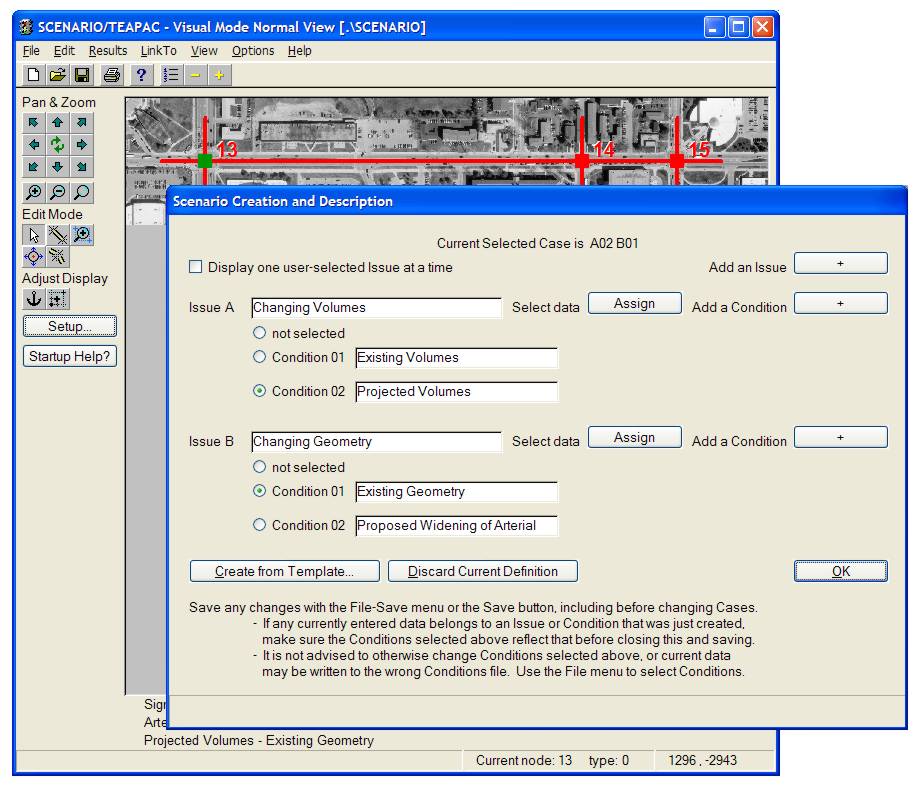
click the image above for a full-size view of
a typical scenario creation dialog found in
SCENARIO
November 11, 2005
|
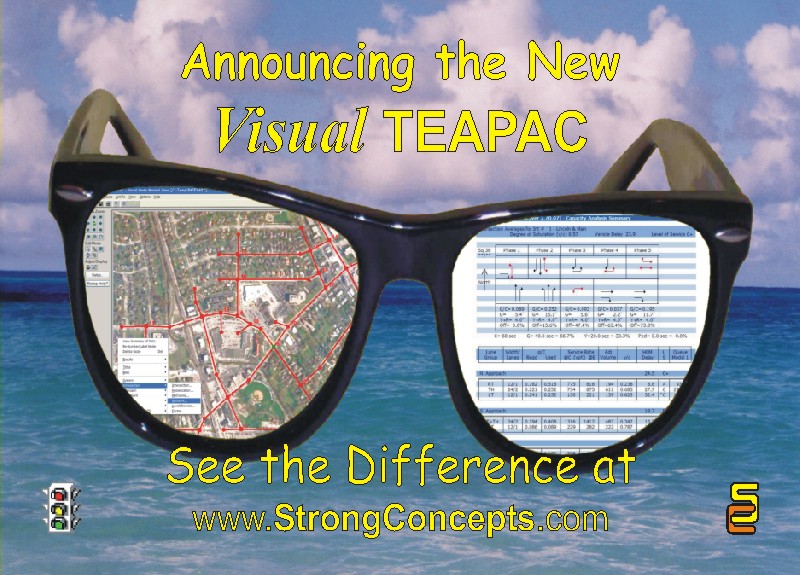
click
the 'Visual Shades' image above
to see the postcard announcement of
Visual TEAPAC
|
|
|
| What's New: |
Visual
TEAPAC - A Whole New Way of Seeing
TEAPAC!
| |
A New Graphical
Input Interface and Graphical Results
Added to the Seamless Integration of
TEAPAC |
|
| |
Visual TEAPAC
(Version 7) has been released with major
enhancements, primarily a new
graphical input user interface and enhanced
graphical output reports. Read on to see examples
of how Strong Concepts' 30+
years of PE/PTOE experience
in traffic and transportation engineering and
professional software development are hard at
work for the Visual TEAPAC
user.
|
| |
Summary
of Enhancements details
|
| |
| »» |
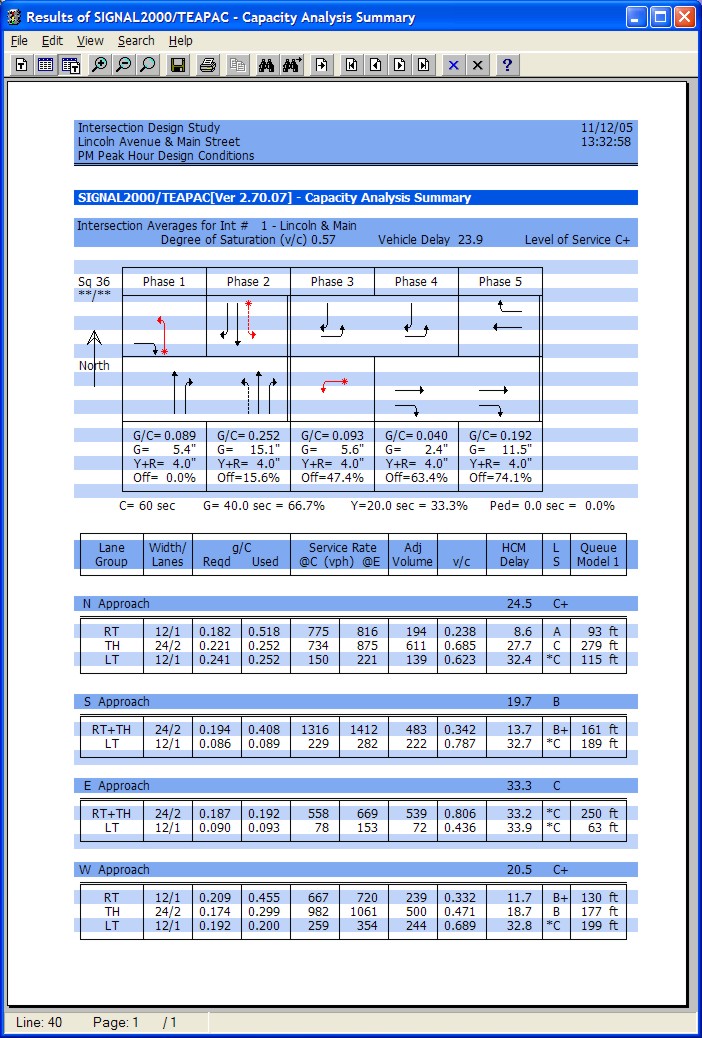
A new graphical
front-end allows network
creation and editing directly on-screen. examples
|
| |
| • |
Drag-and-drop
creation or editing of analysis
network. |
| • |
Bitmap background
for ease of creating network and
visualizing results (aerial
photo, map, plan drawings, etc.) |
| • |
Right-click
access to all data entry dialogs,
as well as analysis results
dialogs. |
|
| »» |
New enhanced
graphical reports make results
easier to read and nicer to look at. examples
|
| |
| • |
Full use of color
and graphics drawing for arrows,
phasing diagrams, permitted
movements,
time-space diagrams, intersection
diagrams, cycle optimization
graphs, daily count variation
graphics, etc. |
| • |
Printable
on any color or black-and-white
printer supported by Windows;
pastable as .bmp into any other
application. |
|
| »» |
SIGNAL2000
and all PRE-processors
feature new ring-based timing
display option and
new permitted left turn features. examples
|
| »» |
SITE
performs on-screen assignments
on the new graphical network display in
the main window. examples
|
| »» |
Visual TEAPAC has
all the amazing seamless data exchange
features first offered by TEAPAC2004 for
the 13 TEAPAC programs and 14 programs by
others. flowchart
|
| |
| • |
One
data file carries all
data for all
programs, with up to 500
intersections per
file/analysis! |
| • |
One-click,
split-second transfer of control and
input data from one program to
another. |
| • |
Seamless,
one-click exchange
of results to each other, such as
Peak Period Volumes, PHF,
Projected Volumes, Optimized
Timings, etc. |
| • |
Upwards/downwards
compatible with
prior TEAPAC data files. |
|
| »» |
Downloadable
manuals have been updated
(printable and searchable PDFs). |
|
|
|
| |
Details |
| |
| »» |
Click here for more details
on all the generic Visual TEAPAC
Version 7 changes found in
every TEAPAC program. |
| »» |
Click here to see all the changes
for individual programs. |
| »» |
Click here to see budget-friendly
pricing, including upgrade
prices. |
|
|
|
| |
Animated
Slide Show of Features |
| |
| »» |
Click here for an animated
PowerPoint slide show
illustrating the easy data
exchange provided by Visual TEAPAC,
including typical project applications. (right-click
during show to adjust presentation.) |
| »» |
Click here for a PowerPoint
slide show summarizing the
basic functions and integration of each Visual TEAPAC
program. (right-click during show to
adjust presentation.) |
|
|
Click the images
below for a full-size view of the
new graphical input interface, graphical output formats, and
one-click seamless integration
found in Visual
TEAPAC:
Network Creation and Editing on Bitmap
Background with All Visual
TEAPAC Programs:
(illustrated with SIGNAL2000)

click anywhere within the image above
for a more detailed view -- click here to download a demo
Data Entry
from Right-click on Network/Bitmap with All Visual
TEAPAC Programs:
(Normal View graphical data entry illustrated with
PRETRANSYT)
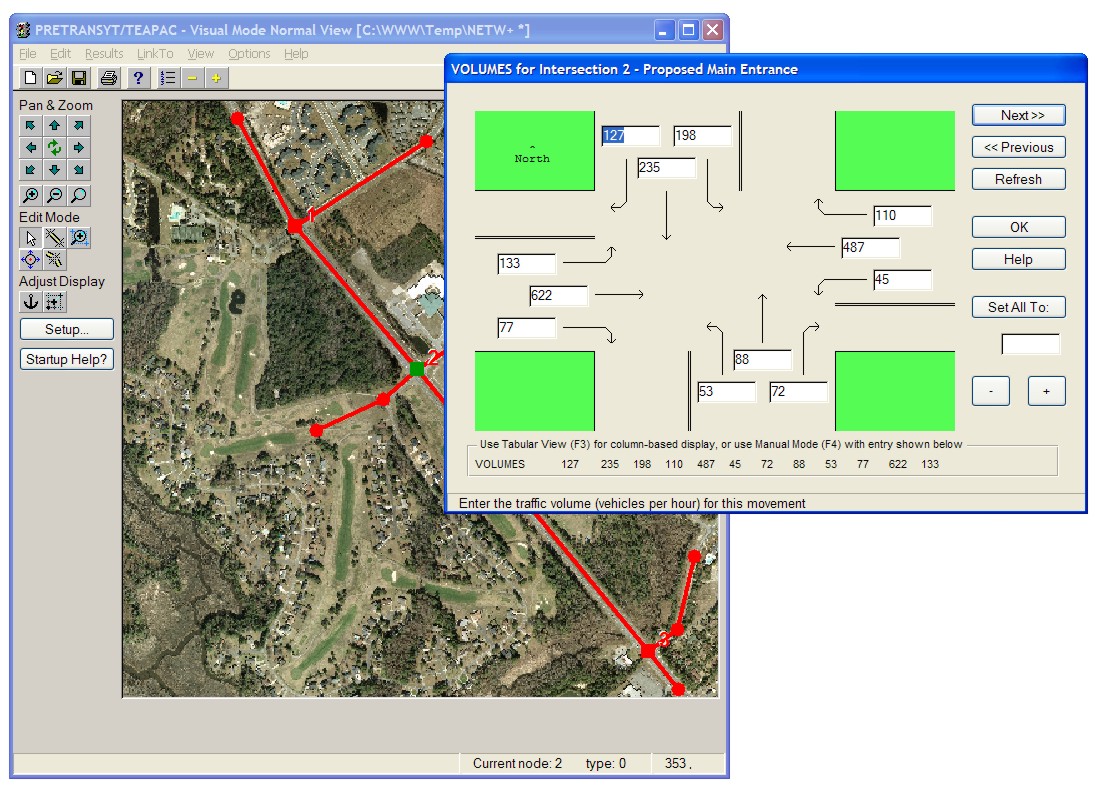
click anywhere within the image above
for a more detailed view -- click here to download a demo
Data Entry
from Right-click on Network/Bitmap with All Visual
TEAPAC Programs:
(Tabular View dense data entry illustrated with
PRETRANSYT)
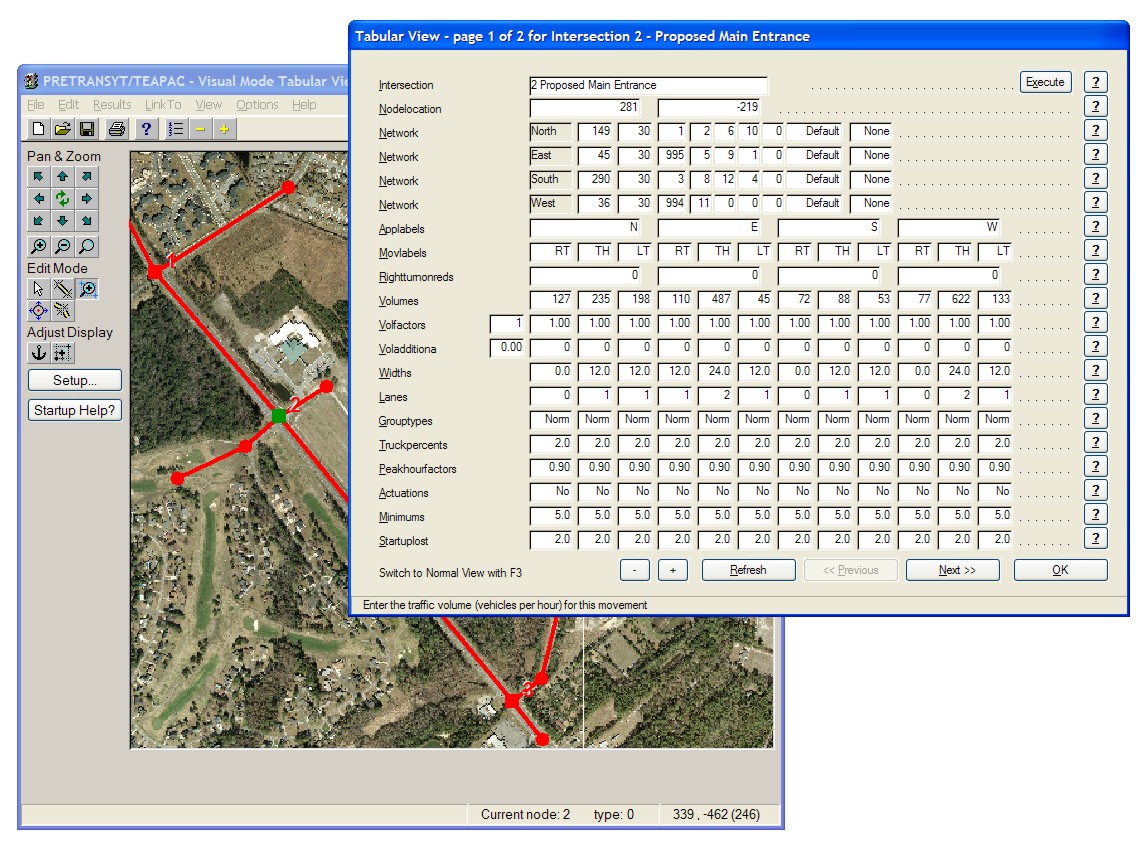
click anywhere within the image above
for a more detailed view -- click here to download a demo
HCM-Compliant Capacity Analysis and
Optimization with SIGNAL2000:
(illustrating new ring-based timing display)
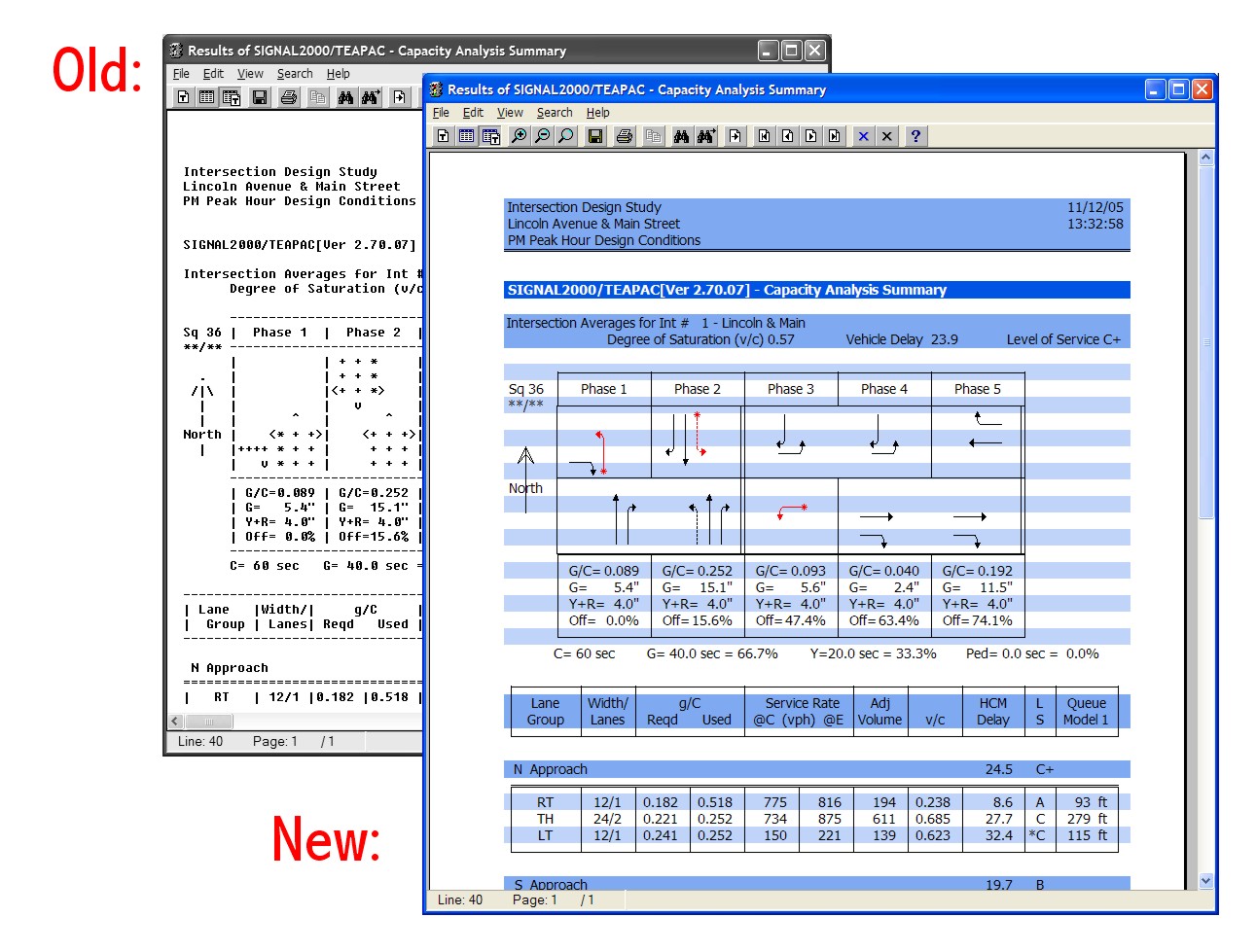
click anywhere within the image above
for a more detailed view -- click here to download a demo
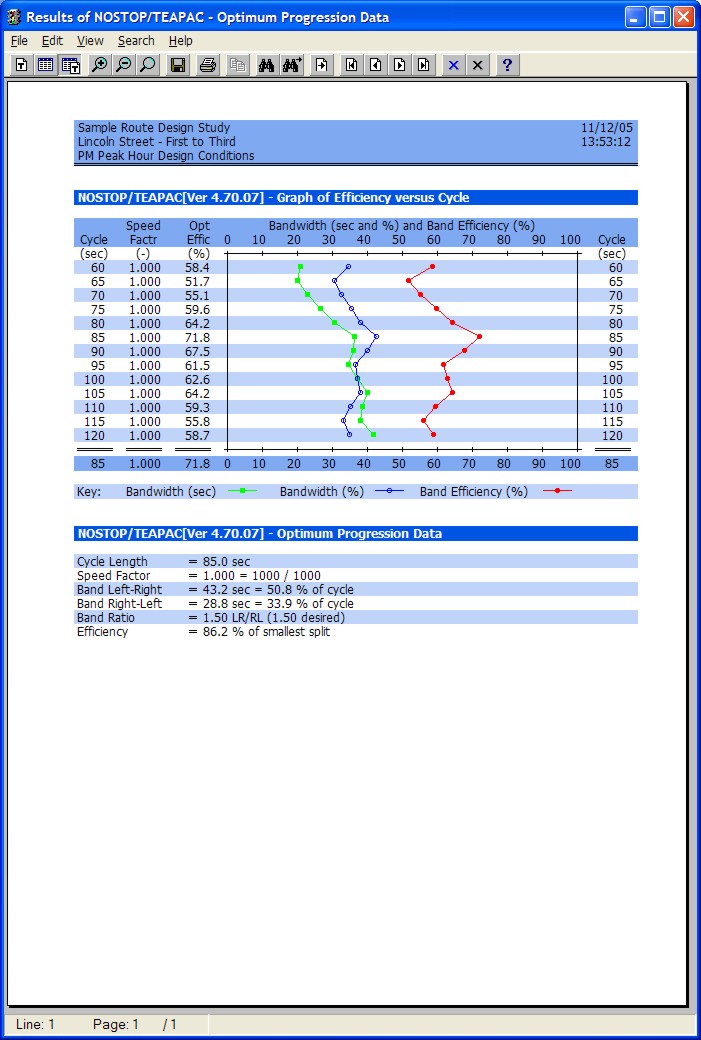
Cycle
Length Optimization for Progression with NOSTOP:
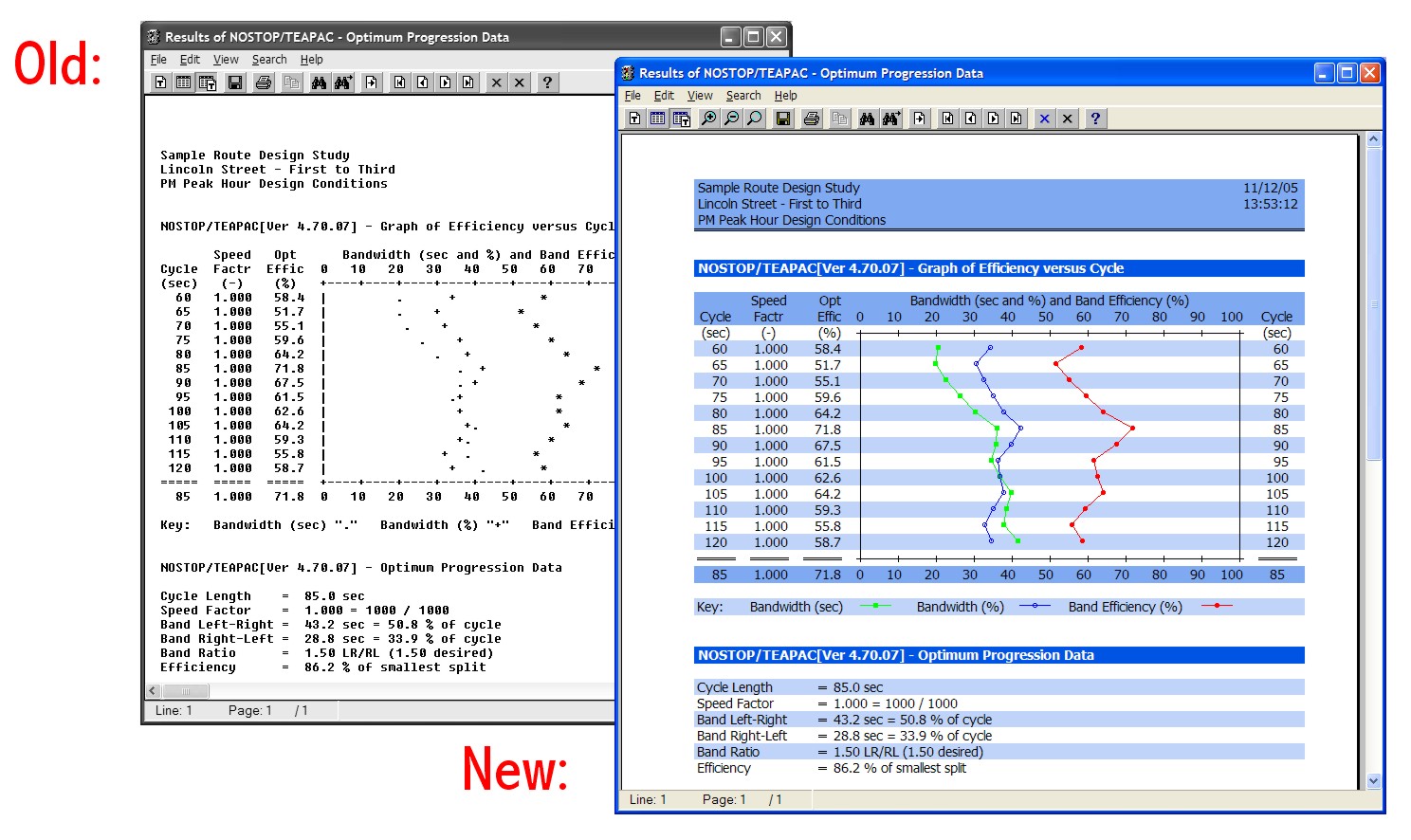
click anywhere within the image above
for a more detailed view -- click here to download a demo
Time-Space
Progression Diagram with NOSTOP and all PRE-Processors:
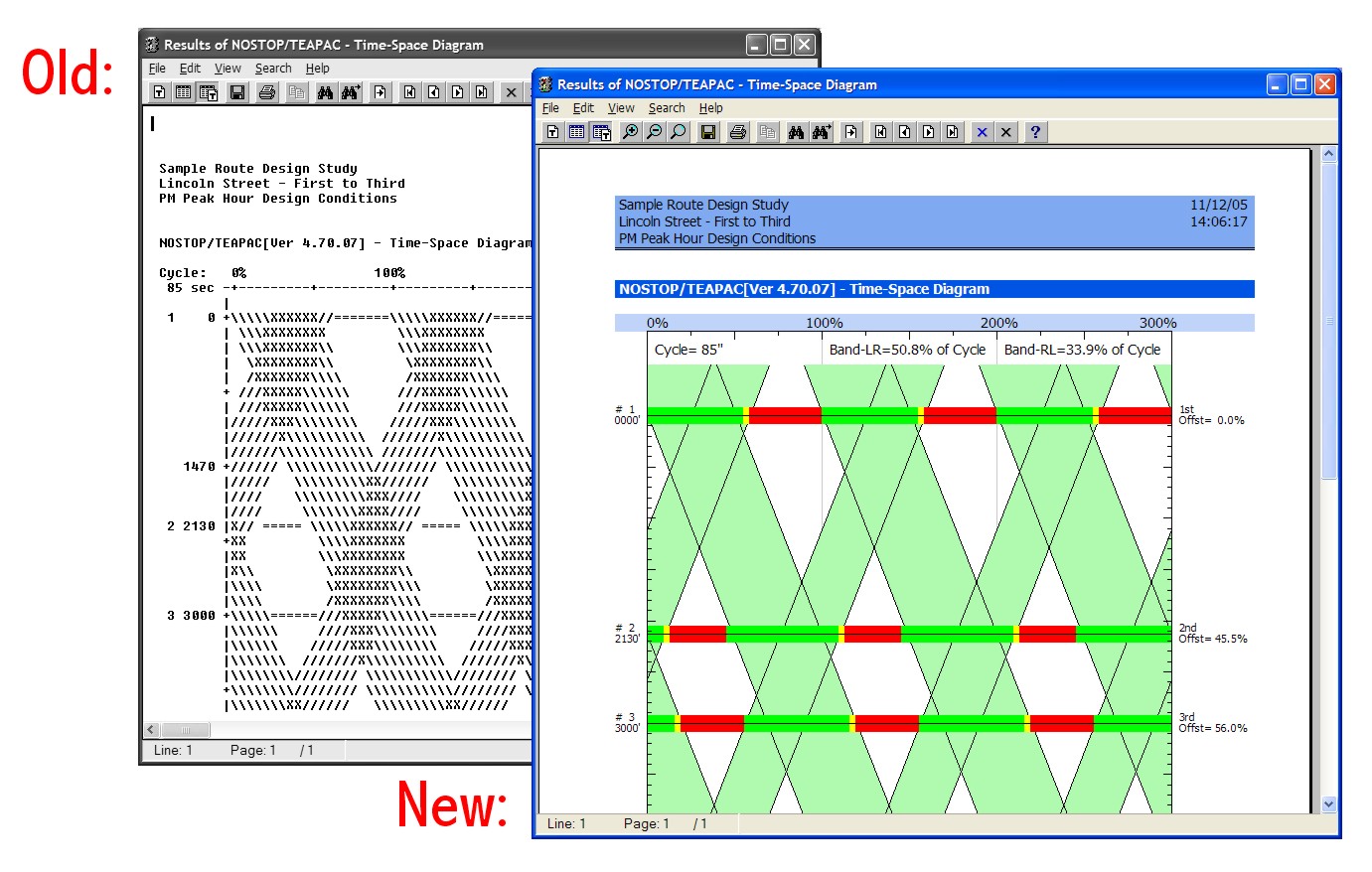
click anywhere within the image above
for a more detailed view -- click here to download a demo
On-screen FindPaths shortest-path assignment
option with SITE:
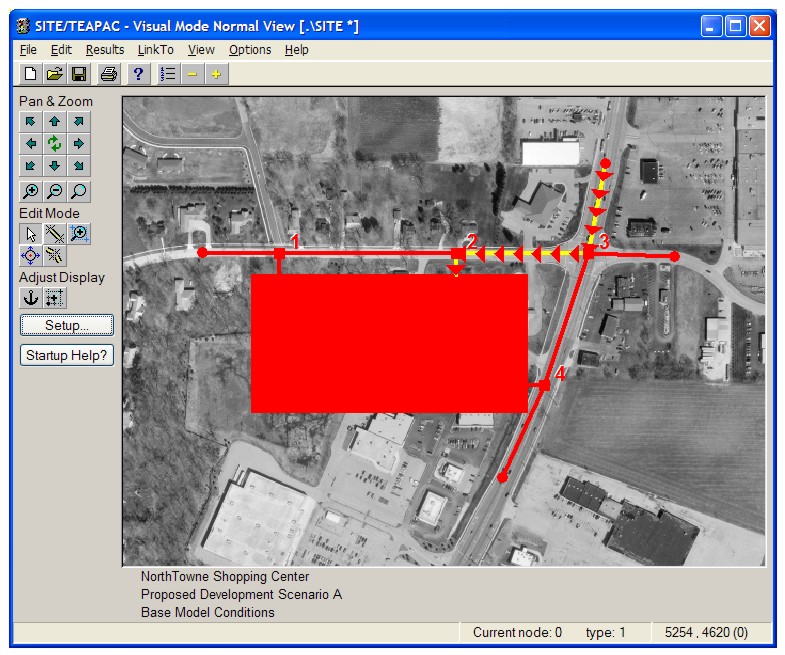
click anywhere within the image above
for a more detailed view -- click here to download a demo
Unparalleled
one-click, seamless integration found in Visual
TEAPAC:
click anywhere within the image above
for a more detailed view
September 22, 2004
(Version 6.01 Build 12 maint
update
posted Sep 30, 2005)
|
APWA International Public
Works Exposition
Minneapolis, Minnesota
Booth #2057 |
|
|
| What's New: |
TEAPAC2004 - The Ultimate Integrator!
| |
TEAPAC
Version 6 Released After 2 Years In
Development details
Seamlessly Integrates 13 TEAPAC Programs
and 14 Other Programs flowchart
|
|
| |
After 2 years in
design and development,
TEAPAC2004
(TEAPAC Version 6) has been released
with major enhancements
to the integration capabilities, to the generic
user interface, and to each of the 13
individual programs. Read on to see how Strong
Concepts' 30 years
of PE/PTOE experience in traffic and
transportation engineering and
professional software development are hard at
work for the TEAPAC2004 user.
|
| |
Summary
of Enhancements details
|
| |
| »» |
All
TEAPAC2004 programs are
now completely seamlessly
integrated! |
| |
| • |
One
data file carries all
data for all
programs, with up to 500
intersections per
file/analysis! |
| • |
One-click,
split-second
transfer of control and
data from one program to another. |
| • |
Upwards/downwards
compatible with
prior TEAPAC2000 data files. |
|
| »» |
Major
Upgrades for
SITE, WARRANTS
and TURNS |
| |
| • |
Seamless,
one-click exchange
of results (Peak Period Volumes,
PHF, Projected Volumes, etc.) to
each other, SIGNAL2000,
PREPASSR, PRETRANSYT,
PRENETSIM, PRESYNCHRO,
PRETSPPD and PRENOSTOP. |
| • |
Up
to 500 intersections
per file/analysis. |
|
| »» |
SIGNAL2000
and all PRE-processors
feature new volume sensitivity
analysis features. |
| »» |
PRENOSTOP
is a new program connecting NOSTOP
with the other TEAPAC2004
programs. |
| »» |
Major
enhancements to the TEAPAC Version
6 user interface which is
found in all TEAPAC2004
programs. |
| |
| • |
Global Input
Option allows any single
entry to apply to all
intersections. |
| • |
Enhanced
menus and buttons in Output
window for easier
navigation of large outputs. |
| • |
Easier
navigation for pan and
zoom in View-Network
display with bitmap background. |
| • |
Many
other enhancements
for increased functionality and
useability (see Details below). |
|
| »» |
Downloadable
manuals are printable and
searchable. |
|
|
|
| |
Details |
| |
| »» |
Click here for more details
on all the generic TEAPAC
Version 6 changes found in
every TEAPAC program. |
| »» |
Click here to see all the changes
for individual programs. |
| »» |
Click here to see budget-friendly
pricing, including update
and upgrade prices.
(if
you are using a recent version of a given
TEAPAC program, use the
Help-CheckForUpdates menu to see your
price.) |
|
|
|
| |
Animated
Slide Show of Features |
| |
| »» |
Click here for an animated
PowerPoint slide show
illustrating the easy data
exchange provided by TEAPAC2004,
including typical project applications. (right-click
during show to adjust presentation.) |
| »» |
Click here for a PowerPoint
slide show summarizing the
basic functions and integration of each TEAPAC2004
program. (right-click during show to
adjust presentation.) |
|
|
Click the image below for a
full-size diagram of the unique integration found in TEAPAC:
Strong Concepts is
the developer and distributor of the widely-used TEAPAC software.
TEAPAC is an integrated suite of applications designed to perform
many common traffic engineering analyses such as traffic
operations, capacity analyses, traffic survey summaries, site
planning and design.
TEAPAC is an
acronym for
TRAFFIC ENGINEERING ANALYSIS
PACKAGE
Home | About Us | Products | Distributors | Demo Software | Price List | Ordering Information | Training/Events Calendar | Publications | Related Sites | Contact Us
this page last
updated
April 15, 2019